⏱️ Reading time: 10 min
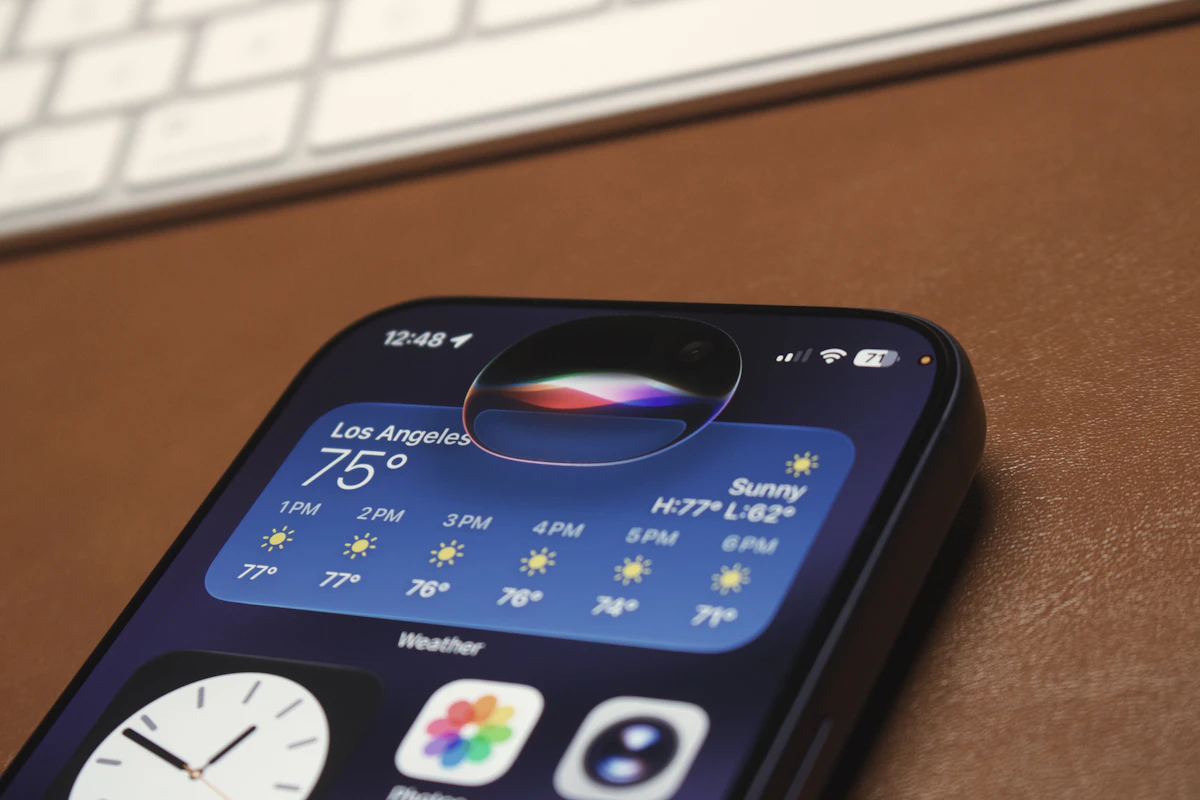
Apple activated today, September 14, 2026, the update that replaces Siri after years of unfulfilled promises: Siri AI arrives in beta alongside iOS 27, iPadOS 27, and macOS 27, with personal context understanding, on-screen awareness, and actions within third-party apps.
📑 En este artículo
The company also redesigned the Screen Time flow and added parental controls developed with child safety experts, along with improvements to Photos, Safari, and the Camera app that reach all users, not just those who enable the Siri AI beta.
TL;DR
- Apple launched Siri AI on September 14, 2026 alongside iOS 27, iPadOS 27, and macOS 27.
- Siri AI launches in beta in English; Spanish, French, Japanese, Korean, and Portuguese arrive in October 2026.
- Siri integrates with the iPhone’s Camera mode to split bills and pay with Apple Cash.
- The new Siri app syncs conversation history via iCloud across iPhone, Mac, iPad, Watch, and Vision Pro.
- Visual Intelligence lets you ask Siri about what’s on screen on iPhone, iPad, and Mac.
- Photos gains Spatial Reframing, Extend, and an improved version of Clean Up.
- Image Playground generates photorealistic images with metadata and upcoming support for SynthID.
- Parental controls add Ask to Browse and an expanded Communication Safety that detects violent content.
Introduction
With this update, Siri AI stops being the fixed-command assistant that Apple launched in 2011 and becomes a conversational model built on the new generation of Apple Intelligence. The change isn’t cosmetic: Apple rewrote the assistant’s entire architecture so it understands personal context in messages, emails, and photos, recognizes what the user sees on screen, and executes actions within third-party applications without developers having to integrate a complex SDK.
The announcement comes alongside updates to iOS 27, iPadOS 27, macOS 27, watchOS, and visionOS, all available today as a free download for compatible devices.
What happened
Siri AI is being distributed today as a public beta in English. Apple confirmed that support for French, Japanese, Korean, Portuguese, and Spanish arrives in October 2026, one month after the initial launch in the United States and other English-speaking markets.
The most visible integration is in the iPhone’s Camera app, which now includes a mode called Siri mode: point the camera at a restaurant receipt and ask Siri to split the bill and pay your friends with Apple Cash, or add a personalized boarding pass to Wallet from a photo. The Visual Intelligence feature extends to iPhone, iPad, and Mac: users can ask Siri about anything on screen, and on Apple Vision Pro it’s enough to look at an object in the environment and ask out loud.
For heavy writers, Write with Siri generates complete drafts from a description and helps rewrite already-written text, available in any app that uses the system’s text controls. And for the first time there’s a dedicated Siri app that privately stores conversation history in iCloud, so you can start a conversation on your iPhone on your way to work and continue it on your Mac when you get to the office, without repeating the context.
flowchart TD
    A["iPhone"] --> C["Siri History"]
    B["Mac"] --> C
    D["iPad"] --> C
    E["Apple Watch"] --> C
    F["Vision Pro"] --> C
    C --> G[("Private iCloud")]
    subgraph Synchronization
    C
    G
    end
Context and history
Siri debuted on the iPhone 4S in 2011 as the first mass-market voice assistant on a phone. For over a decade, Apple kept it virtually unchanged: rigid commands, little context understanding, and no ability to sustain a multi-turn conversation. The gap became evident as competitors integrated everyday conversational models into their own assistants.
In 2024 Apple introduced the first version of Apple Intelligence, but the deep rewrite of Siri promised for that generation was delayed by more than a year, to the point that the company itself publicly acknowledged falling behind the competition. Siri AI is, in effect, the delivery of that promise: the first version of Siri built on its own conversational model, rather than a command layer on top of a classic voice recognition engine.
💭 Key point: Apple chose to launch Siri AI as a beta in a single language before expanding it, the same gradual strategy it used with Apple Intelligence in 2024. The stated goal is to avoid context errors before scaling to more markets.
Technical details and performance
For developers, the key piece remains App Intents, the framework that lets an app expose actions for Siri AI to execute by voice or text without opening the interface. With the new generation, Apple expanded the types of parameters Siri can infer from on-screen context, so a well-defined action in App Intents can automatically receive data that previously had to be explicitly requested from the user.
A minimal example of an action exposed to Siri AI with App Intents in Swift looks like this:
import AppIntents

struct DividirCuentaIntent: AppIntent {
    static var title: LocalizedStringResource = "Split bill"

    @Parameter(title: "Total amount")
    var monto: Double

    @Parameter(title: "Number of people")
    var personas: Int

    func perform() async throws -> some IntentResult {
        let porPersona = monto / Double(personas)
        return .result(dialog: "Each person pays \(porPersona) dollars")
    }
}
This intent becomes available for Siri AI to invoke directly from Camera mode when it recognizes a receipt, without the developer having to write image recognition logic: the system handles that part.
The dedicated Siri app syncs history via iCloud, something you can verify in a simple way:
# On macOS, confirm the machine is already running macOS 27
sw_vers -productVersion
# Expected output: 27.0 (or later)

# Confirm that Siri AI (beta) is active
defaults read com.apple.assistant.support "Siri AI Beta Enabled"
If the second command returns 1, the beta is active on that machine. The equivalent check on iPhone and iPad is in Settings → Apple Intelligence & Siri → Siri AI (Beta): the toggle should appear enabled and the configured language should be English until the October update arrives.
| Feature | What it does | Available today | Limitation |
|---|---|---|---|
| Classic Siri | Fixed commands, no conversation memory | Yes, in all languages | Doesn’t understand context between turns |
| Siri AI (beta) | Conversation with personal and on-screen context | English only | Spanish, French, Japanese, Korean, and Portuguese arrive in October |
| Visual Intelligence | Answers questions about what’s on screen or in the environment | iPhone, iPad, Mac, and Vision Pro | Depends on the app making the data accessible to the system |
| Write with Siri | Generates and rewrites text from a description | Any app with system text controls | Quality depends on the context Siri can read on screen |
How to try it
To try Siri AI today you need three things: a compatible device, the update installed, and the system language set to English, at least for now.
# iPhone or iPad
Settings > General > Software Update > Install iOS 27 / iPadOS 27
Settings > Apple Intelligence & Siri > Enable "Siri AI (Beta)"

# Mac
System Settings > General > Software Update > Install macOS 27
System Settings > Apple Intelligence & Siri > Enable "Siri AI (Beta)"
Once enabled, it’s worth trying Camera mode first by pointing it at a receipt and asking it to split the payment, then Visual Intelligence on an app open on screen, and finally opening the new Siri app to confirm the history also appears on another device with the same iCloud account.
💡 Tip: if your system language isn’t English, change it temporarily in Settings → General → Language & Region just to try the beta; you can revert it without losing your settings.
Impact and analysis
For developers, betting on App Intents as the entry point to Siri AI reduces integration friction: there’s no need to train a proprietary model or maintain a voice recognition server, it’s enough to declare the actions the app already exposes. This favors small teams over companies that had already invested in their own assistants with heavy infrastructure.
For a large part of the user base, parental controls are more relevant than the conversational AI itself. The new child account setup flow lets parents choose which apps a child can use from day one and add more gradually, and Ask to Browse requires a parent to approve every new site before Safari loads it. Communication Safety, moreover, now detects and intervenes on graphic violent content, not just nudity as in previous versions.
⚠️ Watch out: Siri conversation syncing via iCloud means a shared family account on one device can inherit another member’s history if separate profiles aren’t configured.
In terms of privacy, Apple maintains its approach of processing on-device whenever possible and relying on the private cloud only for queries that require more capacity, a design it has used since the first version of Apple Intelligence in 2024.
What’s next
The next confirmed milestone is the arrival of Siri AI in Spanish, French, Japanese, Korean, and Portuguese in October 2026. Apple hasn’t published a date for the beta to exit into general availability, which is typical of its trial programs, which tend to run for several months before reaching all users without manual activation.
It also remains to be seen how support for the SynthID standard evolves for identifying images generated with Image Playground, a feature Apple announced as coming without a specific date.
Try it yourself: update your iPhone to iOS 27 today and enable Siri AI (Beta) from Settings → Apple Intelligence & Siri to try Camera mode with a real receipt.
Frequently Asked Questions
Does Siri AI completely replace classic Siri?
Not yet. Siri AI runs as an optional beta in English; the rest of users continue with the previous Siri until the feature stabilizes and is translated into more languages.
When does Siri AI arrive in Spanish?
Apple confirmed that Spanish support, along with French, Japanese, Korean, and Portuguese, arrives in October 2026.
Which devices can use Siri AI?
Any iPhone, iPad, Mac, Apple Watch, or Apple Vision Pro that can install iOS 27, iPadOS 27, macOS 27, or the corresponding version of watchOS and visionOS, with Apple Intelligence enabled.
Do developers need a new SDK to integrate Siri AI?
No. It’s enough to expose existing actions through App Intents, the same framework Apple has used since iOS 16 for Shortcuts and Spotlight.
What changes in parental controls?
A new child account setup flow, the Ask to Browse feature for approving new websites, and an expanded Communication Safety that detects violent content in addition to nudity.
Does Siri AI work without an internet connection?
Queries that require simple personal context are processed on-device, but those that need more reasoning capacity or world knowledge depend on Apple’s private cloud.
References
- Apple Newsroom: official announcement of the iOS 27, iPadOS 27, and macOS 27 updates with Siri AI.
- Apple Developer, App Intents: official documentation for the framework that connects third-party apps with Siri.
- Wikipedia, Siri: history of Apple’s voice assistant since its 2011 launch.
📱 Enjoying this content? Follow @programacion on Telegram for daily tech content in Spanish: quick summaries, fresh content every day.
Imagen destacada: Foto de Zulfugar Karimov en Unsplash
Did it work for you? Got a different error? Say so below: questions get answered and help the next reader.
Leave a comment



0 Comments